 Gusset
Documentation › Joints: bonded, welds and bolts
Joints: bonded, welds and bolts
How the parts of an assembly are held to each other: bonded all over, welded where the weld metal is, or bolted.
Bonded: how a new study starts
When a model opens, every pair of parts that touch is joined over the whole of the touching faces, as if the model were one piece. This is the simplest way to join a model, and the right one when the joints themselves are not what you are checking: the stress in the parts and the deflection come out as they should.
It shows no weld or bolt to check. For that, switch the welds on.
Welds
- Choose Welds on the Study tab.
- Untick Bond touching parts all over (no welds, no bolts) and accept.
Gusset now lays out a weld on every touching face, as a fabricator would, and looks for bolts in holes that line up. Welds are drawn as beads on the outside of the joint and listed under Connections in the tree.
| Setting | Choices |
|---|---|
| Type | Fillet weld: joins the parts in a band one leg wide round the edge of the touching face; the rest of the face is not joined. Butt weld (full penetration): fuses the whole face. Automatic: a fillet where the face is wider than the weld, otherwise a butt weld. |
| Fillet size | From the thinner part: a leg of 0.7 × the thinner part's thickness, between 3 and 12 mm. Or type your own leg. |
| Along the joint | Continuous, or stitched: as a share of the length, or as weld and gap lengths. |
Thin edges, such as tube ends and plate edges, are fused right through whichever type is chosen.
The settings under Welds apply to every weld. To give one weld its own type, size or stitching, double-click it in the tree. Use the setting for all welds in its panel drops that again.
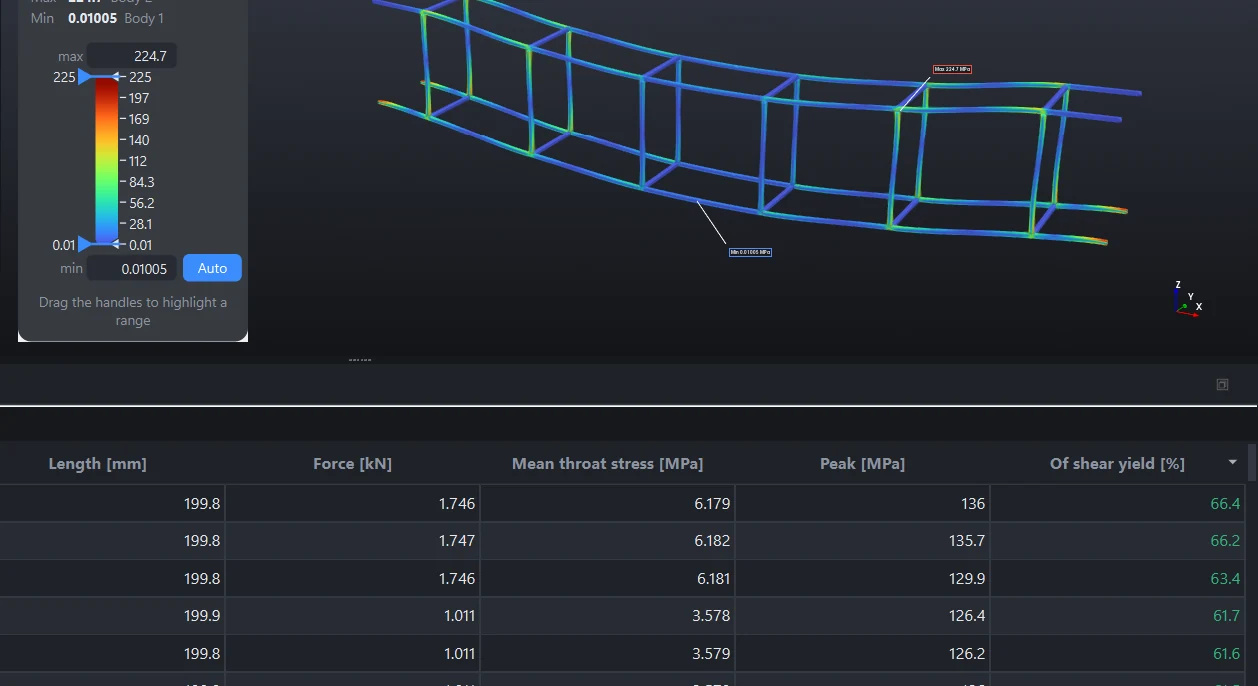
What you get for each weld
After a solve, the Welds tab of the summary table lists for each weld its type, length, the force it passes, the mean and peak stress on its throat, and that stress as a share of the shear yield of the weaker part (yield ÷ √3). A fillet's throat is taken as 0.707 × its leg. Tick Weld stress on the Results tab to draw the throat stress along every weld on the model.
The weld guide for the fabricator
File › Export weld guide writes a PDF for the shop floor: a numbered weld schedule, then for each kind of weld a picture of the joint with the weld lit up, a dimensioned sketch, the stitch pattern and what to do in plain words. When the study has been solved it also says how hard each weld works. It is a guide to what was analysed. It is not a qualified welding procedure.
Bolts
With the welds switched on, parts that touch and share holes on one axis become a bolted joint instead of a welded one, with a bolt in each hole sized from the hole. Choose Joints on the Study tab to set them.
| Setting | What it is |
|---|---|
| Standard | Metric (ISO), M5 to M36, or Imperial (UNC), 1/4" to 1 1/2". |
| Grade | 4.6 to 12.9, or SAE 2 to 8. |
| Preload | As a share of the proof load. 75% is usual for joints that are taken apart again, 90% for permanent ones. |
| Friction | Between the clamped plates, for the slip check. Dry steel is about 0.2. |
| Each bolt | Its size, from the sizes that fit the hole. Untick a bolt to leave it out. |
Quick, or with contact and preload
The box under the accuracy, beside Solve, chooses how bolted joints are solved.
| Bolts: quick (no contact) | Bolts: contact and preload | |
|---|---|---|
| What is solved | The plates are held together under each bolt | The bolts are tightened; the plates press where they touch and open elsewhere |
| Time | Seconds | Much longer |
| You get | Pull and shear at each bolt, the clamp force left, the slip check | The same, and the contact pressure and where the joint opens |
In the quick solve the bolt tension is the preload and the whole of the pull added together, which is an upper bound. Start with quick, and use contact and preload when a joint matters.
What you get for each bolt
The Bolts tab lists each bolt's preload, tension, shear, stress and share of its proof load. The Joints tab lists each joint's clamp force, the shear across it against what friction can hold, whether it slips, the area in contact and the largest contact pressure.
What counts as a bolt
- Tapped holes. Where the hole at one end is too small for the bolt the others clear, the bolt screws into that part and is drawn with a head and no nut.
- Not a bolt: a hole much wider than any bolt that would pass it, such as the bore for an axle, and a hole with a part's shaft through it, such as a pin or a bolt you modelled. That part is joined where it touches.
- Removing bolts. Right-click a bolt or a bolted joint, or select it and press Delete. Parts left with no bolts are welded where they touch. Right-click Connections to put removed bolts back.
Bolts that hold the model to the ground are a fixture, not a joint: see Anchor bolt.
One pair of parts at a time
Select two parts in the tree (Ctrl-click), then right-click and open Connection. Or right-click a connection in the tree.
| Choice | Means |
|---|---|
| Automatic | Bolts where holes line up, otherwise as every other joint in the study |
| Bolted | The bolts found in the holes that line up through the two parts |
| Fillet weld round the edge | A fillet on this pair, whatever the study's setting |
| Bonded over the whole touching face | Joined all over, as one piece |
| Not connected | The parts touch and are not joined |
Several parts selected, such as a stack of sheets, take the choice for every pair among them. A pair set to Not connected stays listed under Connections so that you can join it again.
What joints do not do
- Parts set to Not connected do not press on each other. Contact is solved only in bolted joints.
- The unwelded part of a fillet-welded face is free. It does not press either.
- Sliding of a bolted joint and bending of the bolts are not modelled. The slip check tells you whether friction holds.
- The stress right at a weld root is singular in any elastic analysis. Gusset flags it. Judge a weld by its throat stress in the table, not by the peak colour at its toe.
Something wrong or missing on this page? Tell us.