 Gusset
Documentation › Fixtures
Fixtures
A fixture says where the model is held. A support that is too stiff hides the stress you are looking for, so choose the kind that matches how the real thing is held.
Adding a fixture
- Choose a kind in the Fixtures group of the Study tab, or right-click a face and choose it there.
- Click the faces it holds. Ctrl-click adds a face; clicking a selected face takes it out.
- Accept with the green tick or Enter.
The kinds are all in sight as buttons at the top of the panel, so you can change your mind without starting again.
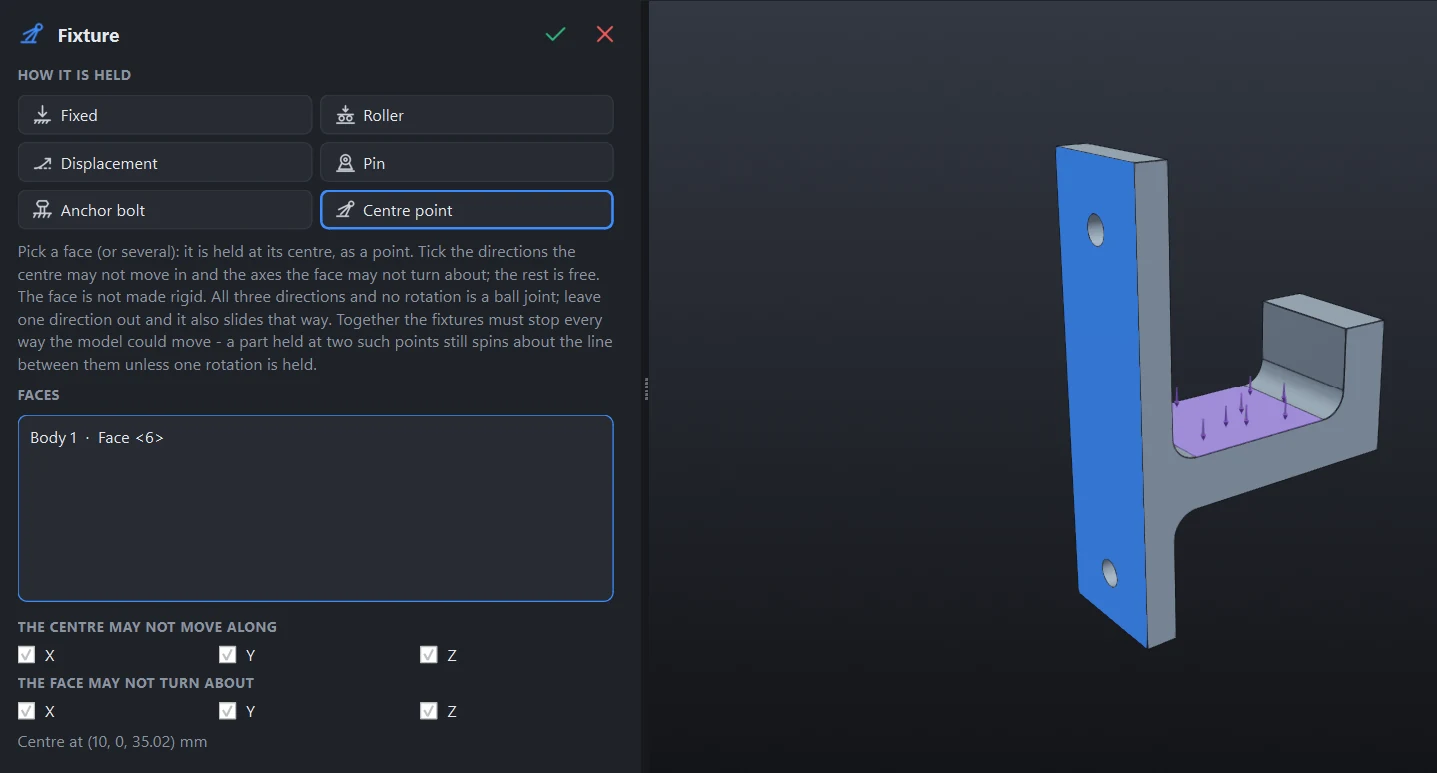
The kinds
| Kind | What it holds | Use it for |
|---|---|---|
| Fixed | The faces cannot move in any direction. | A base welded or bolted down solid. |
| Roller | Only the direction square to the face is held. The face may slide in its own plane. | A part resting on something; a plane of symmetry. |
| Displacement | The directions you tick are moved by the amount you type, in millimetres. Zero holds them. | A support that is pushed a known distance; holding one direction only. |
| Pin | A hole or shaft is held radially, and along its axis unless you tick Allow sliding along the pin. The part may turn about the pin. | A hinge, a clevis, a bearing. |
| Anchor bolt | A bolt hole held to the ground: the hole, and a washer ring on the faces at each end. | A base plate or a wall bracket bolted down. |
| Centre point | The face is held at its centre, as a point: the centre may not move in the directions you tick, and the face may not turn about the axes you tick. | A ball joint; a support that slides one way. |
Rollers on curved faces
A roller on the inside of a hole holds it radially all round, so the part can turn in the hole as it would on a pin.
Pins and anchor bolts
Pick the faces of the hole. Gusset fits a cylinder to them and shows the diameter and axis it found in the panel, or says why the faces do not make a hole. For an anchor bolt, Washer diameter is a multiple of the hole diameter; 0 holds the hole alone.
A face held at its centre
Tick the directions the centre may not move along and the axes the face may not turn about. Everything else is free, and the face is not made rigid.
- All three directions and no rotation is a ball joint.
- Leave one direction out and it also slides that way.
Together the fixtures must stop every way the model could move. A bar held at two ball joints still spins about the line between them, so hold one rotation as well.
Is it held enough?
Before solving, Gusset checks that no part is left free to move. If one is, the solve is refused and the movement is named, for example a part free to spin about a line. Add a fixture or a joint that stops it.
Check the reactions
The report lists what each fixture holds the model with: the force, and the moment about the centre of its faces. All the fixtures together balance the loads and the model's own weight. Read them to see that each support carries what the real one would, and that the load applied is the load you meant.
Choosing well
- Do not fix more than is really held. Fixing the whole underside of a base plate that is only bolted at four holes makes the plate stiffer than it is. Anchor bolts in the holes are closer to the truth.
- High stress right at a fixed face is often the fixture's doing. A face that cannot move at all resists the material next to it. Look a little way in from the edge.
- Edit or remove. Double-click a fixture in the tree to edit it. Right-click it for Suppress, which leaves it out of the next solve without deleting it.
Something wrong or missing on this page? Tell us.